mb-article HTML Format for Quarto
A 3-column academic format for Quarto posts and articles
Abstract text – Lorem Ipsum is simply dummy text of the printing and typesetting industry. Lorem Ipsum has been the industry’s standard dummy text ever since the 1500s, when an unknown printer took a galley of type and scrambled it to make a type specimen book. It has survived not only five centuries, but also the leap into electronic typesetting, remaining essentially unchanged. It was popularised in the 1960s with the release of Letraset sheets containing Lorem Ipsum passages, and more recently with desktop publishing software like Aldus PageMaker including versions of Lorem Ipsum.
Installation
This will install the Quarto extension and create an example .qmd file that you can use as a starting place for your article.
quarto use template mbacou/mb-articleIntroduction
This document is an example that demonstrates the formatting and features of the current HTML format extension for Quarto.
Right is a sample margin note. The left column can also include side margins, but they will display above the TOC and branding (see below).
aside – A note placed in the page margin with CSS classes .aside.note.text-serif.
Lorem Ipsum is simply dummy text of the printing and typesetting industry. Lorem Ipsum has been the industry’s standard dummy text ever since the 1500s, when an unknown printer took a galley of type and scrambled it to make a type specimen book.
Lorem Ipsum is simply dummy text of the printing and typesetting industry. Lorem Ipsum has been the industry’s standard dummy text ever since the 1500s, when an unknown printer took a galley of type and scrambled it to make a type specimen book.
aside – A note placed in the page margin with CSS classes .aside.note.danger.
More Information
You can learn more about controlling the appearance of HTML output under Quarto Documentation.
Brand Colors
Bootstrap colors inherit from _brand.yml so customizations are straightforward.
Typography
Bootstrap default line-height and font sizing typically work, but this format enforces a strict vertical rhythm whenever possible1. I made sure to define all vertical spacing and padding as multiples of a standard line height of $spacer.
1 About vertical rhythm and why it matters for content readability, see Klaas Leussink article on his personal blog.
2 Iosevka Charon is a quasi-proportional font excellent for technical writing and dense UI. These font families are unique derivatives of Iosevka (an open source font project) by be5invis.
No additional changes to font definitions aside from using Crimson Pro and Iosevka Charon Mon fonts2 by default – but fonts are always customizable using a modified _brand.yml file.
Here are bold, italic, and smaller text spans. Here are superscript and subscript characters, and strikethrough notes. Standard Bootstrap semantic colors with e.g. .text-info provide accented text. In addition this theme uses .text-muted to de-emphasize content such as post metadata, margin notes, and captioning, as well as .text-serif for the occasional Serif font.
Heading 2

A rounded image with .rounded-circle.lightbox placed in the margin.
Quoted citation
Over multiples lines.
— From author
Heading 3
Sample paragraph content with list of items:
- List 1
- List 1.1
- List 1.2
- List 2
- List 3
Ordered list:
- List 1
- List 2
- List 3
Finally a normal rule hr divider.
And a paragraph of content after the rule.
Heading 4
By default citations (and cross-references) are read in from an external index.bib file, but this may be edited in the YAML front matter as usual. Each citation must have a key, composed of ‘@’ + the citation identifier from the database. For example here is a margin reference to (Xie 2015).
Heading 5
A longer footnote reference3. Caption and footnote placement are controlled via config files _quarto_yml and/or _metadata.yml, or directly in the document YAML front matter.
3 Here’s a margin note with multiple paragraph blocks and a section header.
Heading 6
With subsequent paragraphs indented to show that they belong to the previous footnote.
Heading 6 (label)
Headers at level 6 are used as section dividers.
Figures & Plots
We recommend using library(brand.yml)4 to automatically apply brand typography and color palette to tables and charts.
4 See brand.yml package documentation for details.
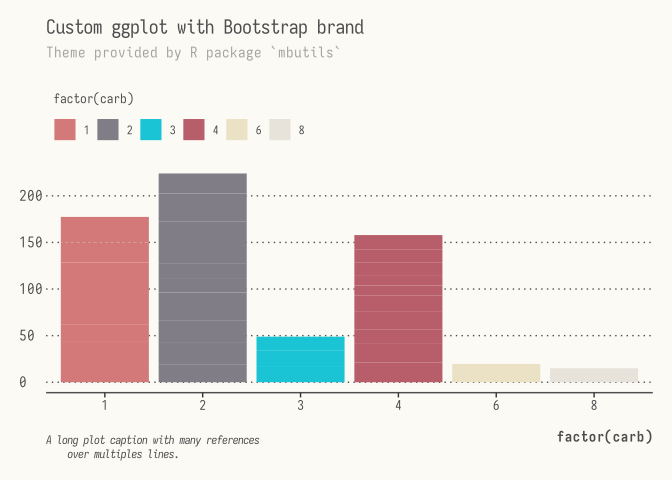
In the example below I use my own R package mbutils to modify chart appearance.
library(ggplot2)
library(mbutils)

ggplot(mtcars, aes(factor(carb), mpg, fill = factor(carb))) +
  geom_col() +
  guides(fill = guide_legend(nrow = 1)) +
  scale_brand_df() +
  labs(
    title = "Custom ggplot with Bootstrap brand",
    subtitle = "Theme provided by R package `mbutils`",
    caption = "A long plot caption with many references
    over multiples lines."
  ) +
  theme_brand(
    base_bg = "light",
    base_color = "gray",
    base_family = "monospace",
    base_size = 11,
    legend.position = "top"
  )
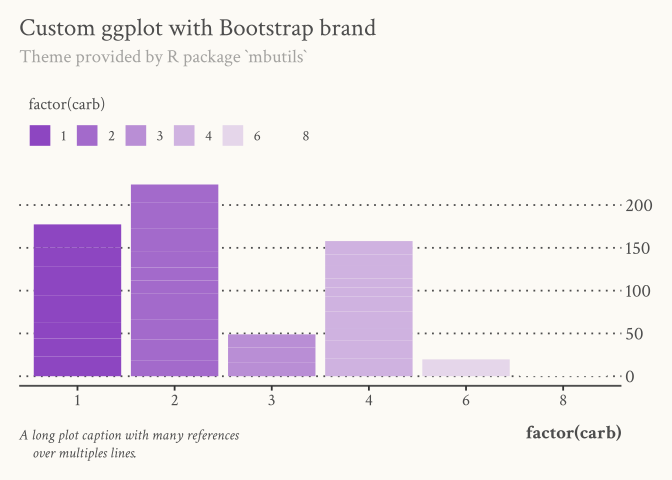
R package mbutils also includes a fully-themed ggplot replacement with brand_on().
brand_on()

ggplot(
  mtcars,
  aes(factor(carb), mpg, fill = factor(carb))
) +
  geom_col() +
  guides(fill = guide_legend(nrow = 1)) +
  scale_brand_df(c("purple", "light")) +
  labs(
    title = "Custom ggplot with Bootstrap brand",
    subtitle = "Theme provided by R package `mbutils`",
    caption = "A long plot caption with many references
    over multiples lines."
  )
# Or using base R plot
col <- sapply((20 + 15 * 6:1) / 100, function(x) pal("purple", alpha = x))
plot(mpg ~ factor(carb), data = mtcars, col = col)
axes(
  c(3, 4),
  nx = F,
  main = "Base R Plot",
  sub = "with Bootstrap branding",
  xlab = "X label",
  ylab = "Y label"
)
legend(legend = 1:6, fill = col, border = NA)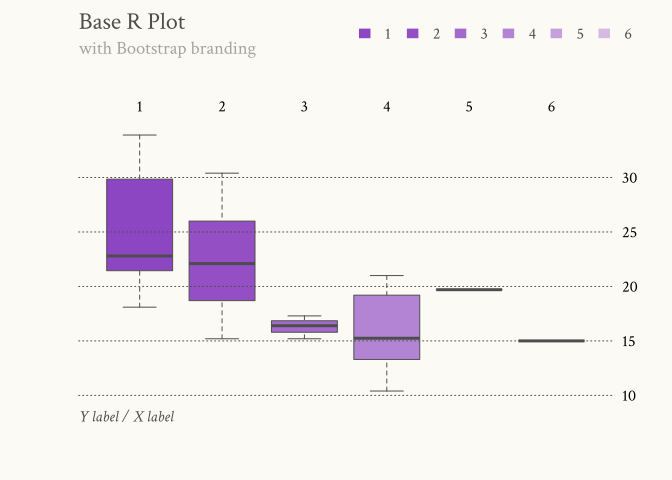
brand_off()Tables
I prefer my tables to use traditional LaTeX typesetting, so a few simple changes to Bootstrap defaults here.
| apple | 2.05 |
| pear | 1.37 |
| orange | 3.09 |
| fruit | price |
|---|---|
| apple | 2.05 |
| pear | 1.37 |
| orange | 3.09 |
| fruit | price |
|---|---|
| apple | 2.05 |
| pear | 1.37 |
| orange | 3.09 |
A table running over the left sidebar.
| fruit | price |
|---|---|
| apple | 2.05 |
| pear | 1.37 |
| orange | 3.09 |
A table running over the right margin.
| fruit | price |
|---|---|
| apple | 2.05 |
| pear | 1.37 |
| orange | 3.09 |
knitr::kable(mtcars[1:6, 1:10])| mpg | cyl | disp | hp | drat | wt | qsec | vs | am | gear | |
|---|---|---|---|---|---|---|---|---|---|---|
| Mazda RX4 | 21.0 | 6 | 160 | 110 | 3.90 | 2.620 | 16.46 | 0 | 1 | 4 |
| Mazda RX4 Wag | 21.0 | 6 | 160 | 110 | 3.90 | 2.875 | 17.02 | 0 | 1 | 4 |
| Datsun 710 | 22.8 | 4 | 108 | 93 | 3.85 | 2.320 | 18.61 | 1 | 1 | 4 |
| Hornet 4 Drive | 21.4 | 6 | 258 | 110 | 3.08 | 3.215 | 19.44 | 1 | 0 | 3 |
| Hornet Sportabout | 18.7 | 8 | 360 | 175 | 3.15 | 3.440 | 17.02 | 0 | 0 | 3 |
| Valiant | 18.1 | 6 | 225 | 105 | 2.76 | 3.460 | 20.22 | 1 | 0 | 3 |
References
Reuse
Copyright
Citation
@online{2025,
  author = {, Author-1 and , Author-2},
  title = {Mb-Article {HTML} {Format} for {Quarto}},
  date = {2025-11-12},
  url = {https://mbacou.github.io/mb-article/},
  doi = {123.4567},
  langid = {en},
  abstract = {Abstract text -\/- Lorem Ipsum is simply dummy text of the
    printing and typesetting industry. Lorem Ipsum has been the
    industry’s standard dummy text ever since the 1500s, when an unknown
    printer took a galley of type and scrambled it to make a type
    specimen book. It has survived not only five centuries, but also the
    leap into electronic typesetting, remaining essentially unchanged.
    It was popularised in the 1960s with the release of Letraset sheets
    containing Lorem Ipsum passages, and more recently with desktop
    publishing software like Aldus PageMaker including versions of Lorem
    Ipsum.}
}